

Feature update: new UI, 8 dependent variables, and global integrals
 By VisualPDE
As with many modern web-based projects, VisualPDE has evolved continuously since we publicly launched it three years ago. We have recently implemented a substantial update to the core simulation interface to make things even easier to use.
We thought this was a nice opportunity to start a news page to explain and motivate these changes, as well as discuss other things over time as we continue to develop VisualPDE in response to user feedback.
Updated user interface
One of the most significant changes from a user perspective is that the button will now open an entirely redesigned user interface for modifying equations, parameters, etc. Below is a “before and after” image of the old interface and the new one.
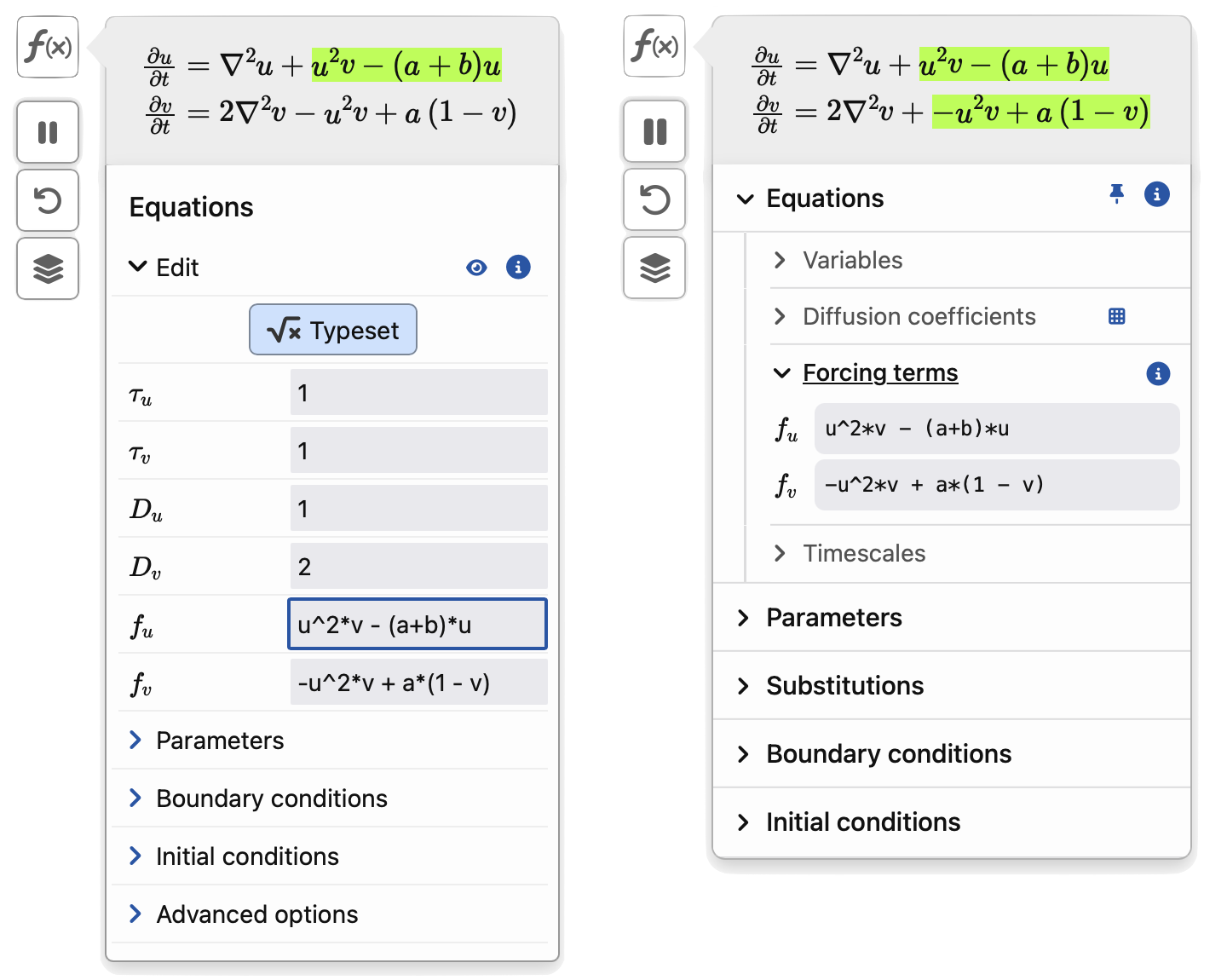 (Left) Old equations user interface (right) new equations user interface.
Much of the redesign focused on rearranging existing interfaces, such as the ability to change the number and name of the independent variables to be more prominent (in the Variables submenu), or more clearly highlighting what each of the Equations submenus was modifying in the typeset equation above. The Diffusion coefficients submenu also has a grid button, which opens up a matrix so that you can enter (cross-)diffusion coefficients directly (useful for handling up to 8 variables at a time—more on that below). We have Adam has also spent time polishing the fonts and size/colour of this new UI, leading to an overall more polished interface throughout.
Substitutions
We’re really excited to introduce the new Substitutions menu, which allows you to define your own notation to simplify complicated expressions. These can be used anywhere in the simulation, and can dependent on space, time, the unknowns, or anything else. We’ve started using these to break up messy or complicated expressions into smaller chunks, making it easier for you to simulate intricate models and organise the appearance of your equations. You can toggle the typesetting of these substitution variables on and off in the typeset equation, so that you can focus on the important parts of your model. For example, you may want to hide an expression that you only use for a messy initial condition.
Eight is bigger than four
When we first built VisualPDE, we used a single RGBA texture to store the data in a simulation. This meant that we had the ability to represent four dependent variables at any given time. Recently, we played around with adding a second texture and, to our surprise, realised that this had almost no impact on performance across a range of devices.
So, with this extra texture in play under the hood, now you can build equations involving between one and eight dependent variables, each of which can be a time-evolving quantity or an algebraic variable (one with no time derivatives). See the page on what VisualPDE can solve for further details, or check out this example of a 5-species cyclic population model for an example that uses these new capabilities.
Integrating integrals
Finally, we have added our first integral terms to the simulation, available using the new syntax Int(expression). This allows for global integrals (i.e. integral terms that evaluate to numerical values independent of space), so that you can solve, for example, the following PDE with a global carrying capacity:
\begin{aligned}
\pd{u}{t} = D \pdd{u}{x} + r u \left[1-\frac{1}{|\Omega|}\int_{\Omega} u\, \d x \right].
\end{aligned}
See how this compares to a local carrying capacity in this local-vs-global simulation.
Simulations including these integrals may run slightly slower, as evaluating integral terms is costlier than local evaluations in VisualPDE. We currently sample the integrals every few timesteps, rather than every timestep, which we’ve found to be a good balance between accuracy and performance. Check out the documentation for these integrals for more details.
Black holes and revelations
We plan to add several new examples exploiting these new features over the coming months, from models of black holes to magnetohydrodynamic instabilities. There are some other big things coming soon, but we’ll save the details for later.
Feel free to contact us if you have any feedback on these changes, suggestions for new simulations, or any questions at all. We are always happy to get messages from users!